
Apple has officially unveiled the new iPadOS 26 update, and it’s the most ambitious leap forward the iPad has seen in years. From a stunning visual redesign that makes your screen feel alive, to an all-new windowing system that brings Mac-like control to multitasking, iPadOS 26 reimagines how users interact with the device they already love. But this update isn’t just about looks — it’s a comprehensive evolution that touches productivity, creativity, and intelligence.
In this preview, we’ll walk through everything the new iPadOS 26 update brings to the table: a fresh design language called Liquid Glass, a desktop-class menu bar and resizable windows, app upgrades for working smarter, creative tools for audio and video, and systemwide intelligence powered by Apple’s new AI platform. We’ll also explore how developers can take advantage of these updates through new APIs and integration points.
If you’re wondering what this means for your workflow, your creative projects, or just your everyday experience with iPad — this breakdown will show exactly how iPadOS 26 is designed to meet you where you are, and help you go further.
A Fresh Design with Liquid Glass Personality
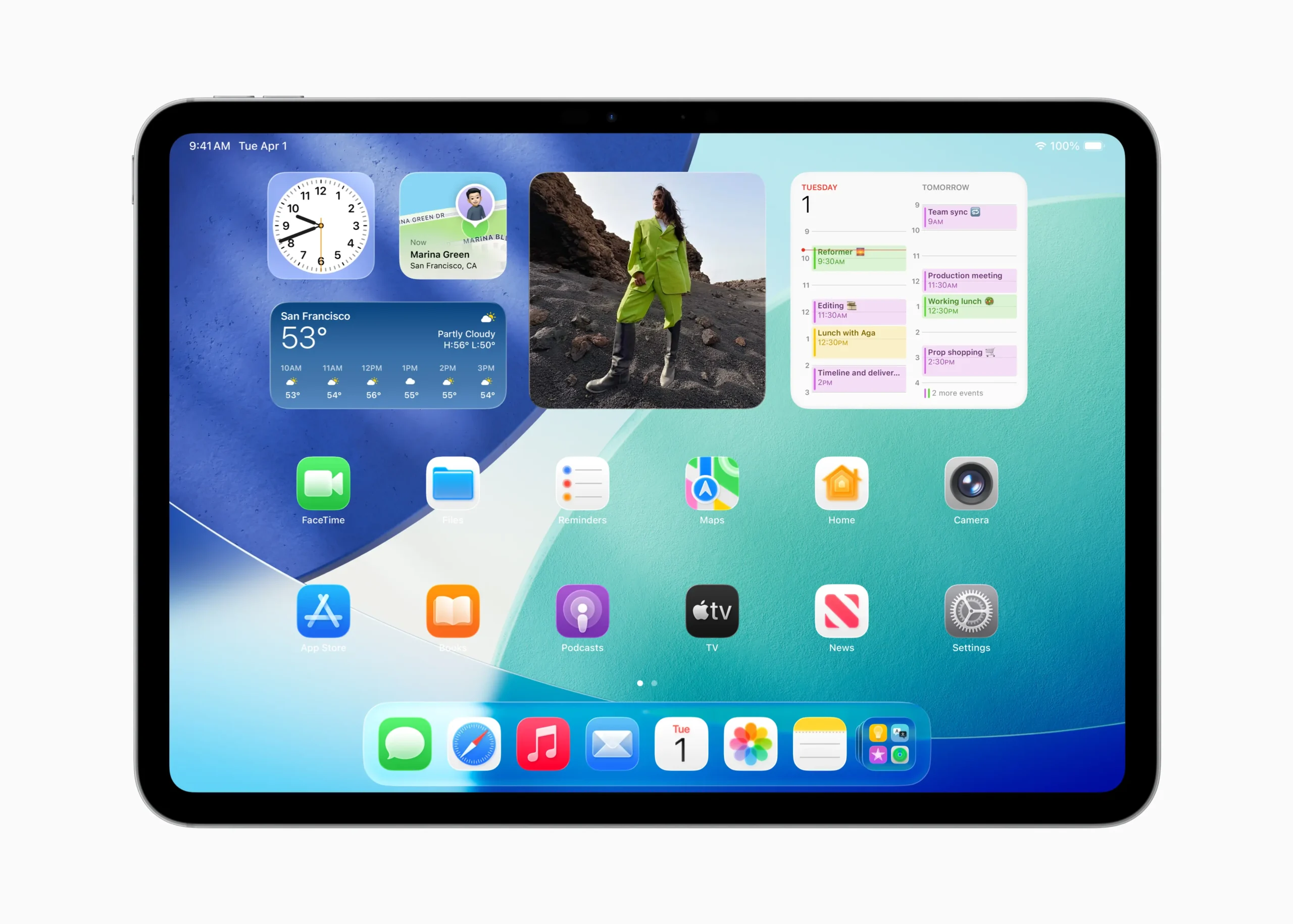
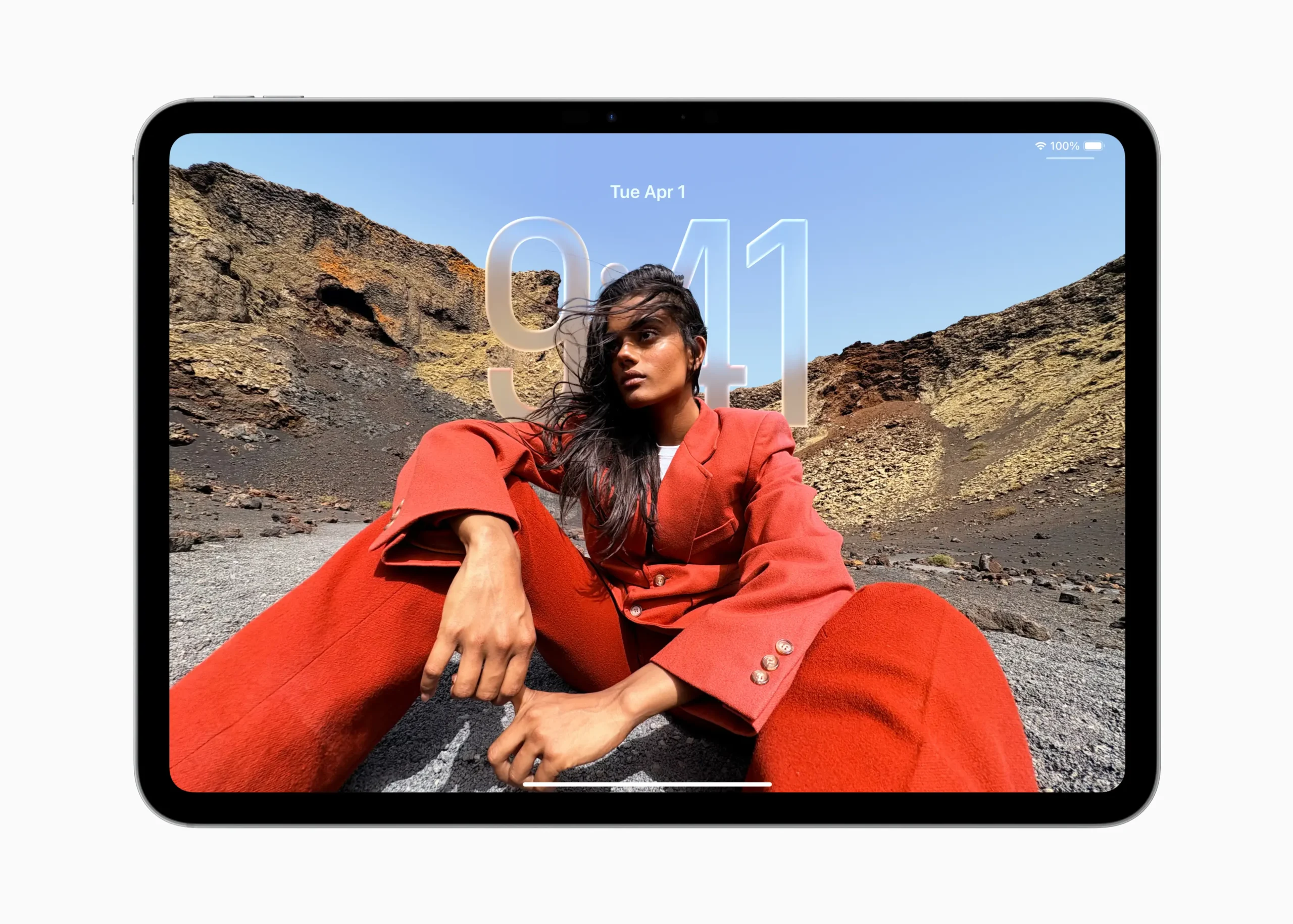
The new iPadOS 26 update introduces a striking visual evolution that blends form, function, and flair. At the heart of this transformation is Liquid Glass, a dynamic interface material that refracts, reflects, and responds to your surroundings and gestures. It’s more than a new look — it’s a design language that gives iPad its most expressive personality yet.
This translucent design layer flows across the entire system, enhancing areas like the Lock Screen, Control Center, and Home Screen. App icons now come alive with vibrant tints that adapt to light or dark mode and subtly animate when interacted with. It’s a small touch, but one that brings warmth and responsiveness to the everyday iPad experience. The visual updates extend to first-party apps including Safari, Mail, Music, and Apple TV, where updated navigation elements and translucency lend a sense of depth and context to every interaction.
Bridging Familiarity and Freshness With The New iPadOS 26 Update
Liquid Glass isn’t just about aesthetics — it’s also designed to make content more central and minimize distractions. Controls fade into the background when not in use, and key interface elements dynamically respond to touch and focus. This design approach reflects Apple’s growing emphasis on personalization and clarity, making the new iPadOS 26 update feel alive, adaptable, and unmistakably iPad.
While Liquid Glass represents a bold new direction, it remains true to iPadOS’s identity. The layout, gestures, and overall usability haven’t changed drastically — instead, they’ve been reimagined to feel more immersive and elegant. Whether you’re browsing the web or sketching in Freeform, the interface now feels both familiar and reenergized, setting the stage for deeper multitasking and smarter interactions in the sections ahead.
Smarter Multitasking with the New Windowing System
One of the most defining changes in the new iPadOS 26 update is a radical overhaul of how multitasking works — a shift that brings iPad closer than ever to the desktop-class experience of macOS. At the core of this transformation is a powerful new windowing system and the Menu bar, designed to make navigation, control, and organization more flexible and intuitive.
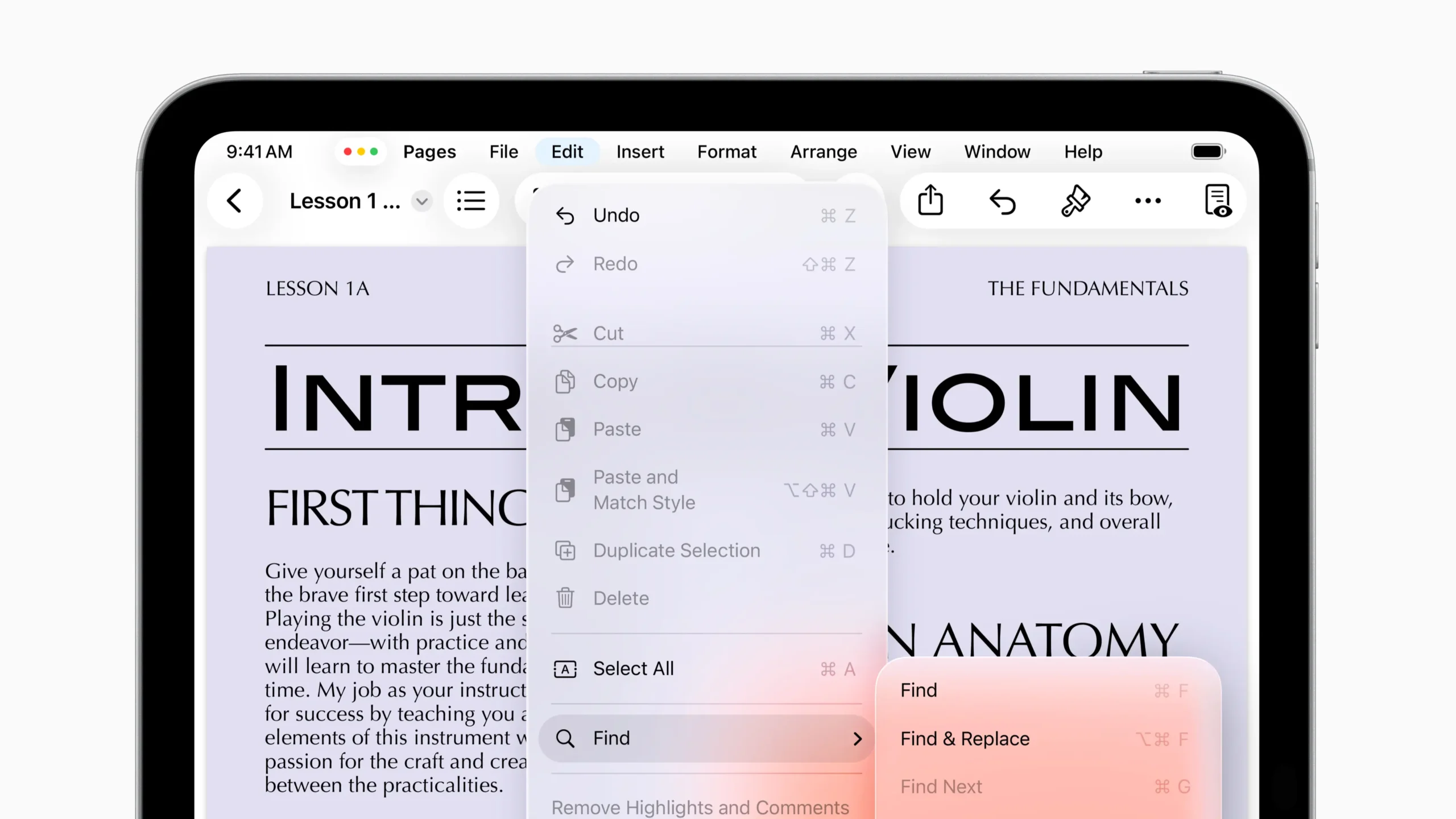
For the first time on iPad, users can fluidly resize windows, place them freely, and reopen apps in their previously adjusted states. This new freedom isn’t just about visual flair — it’s about real productivity. Whether arranging reference material side by side or keeping a communication app floating while editing a document, the update finally gives users precise spatial control over their workflows. iPadOS 26 also remembers window placements across sessions, making transitions between tasks feel continuous and polished.
The New iPadOS 26 Update Is Built for Touch, Trackpad, and External Displays
The windowing system extends its power to Stage Manager, which continues to let users group apps into discrete “stages” for better focus. With support for external displays, users can now work across multiple spaces with an experience that’s strikingly Mac-like — yet fully optimized for touch.
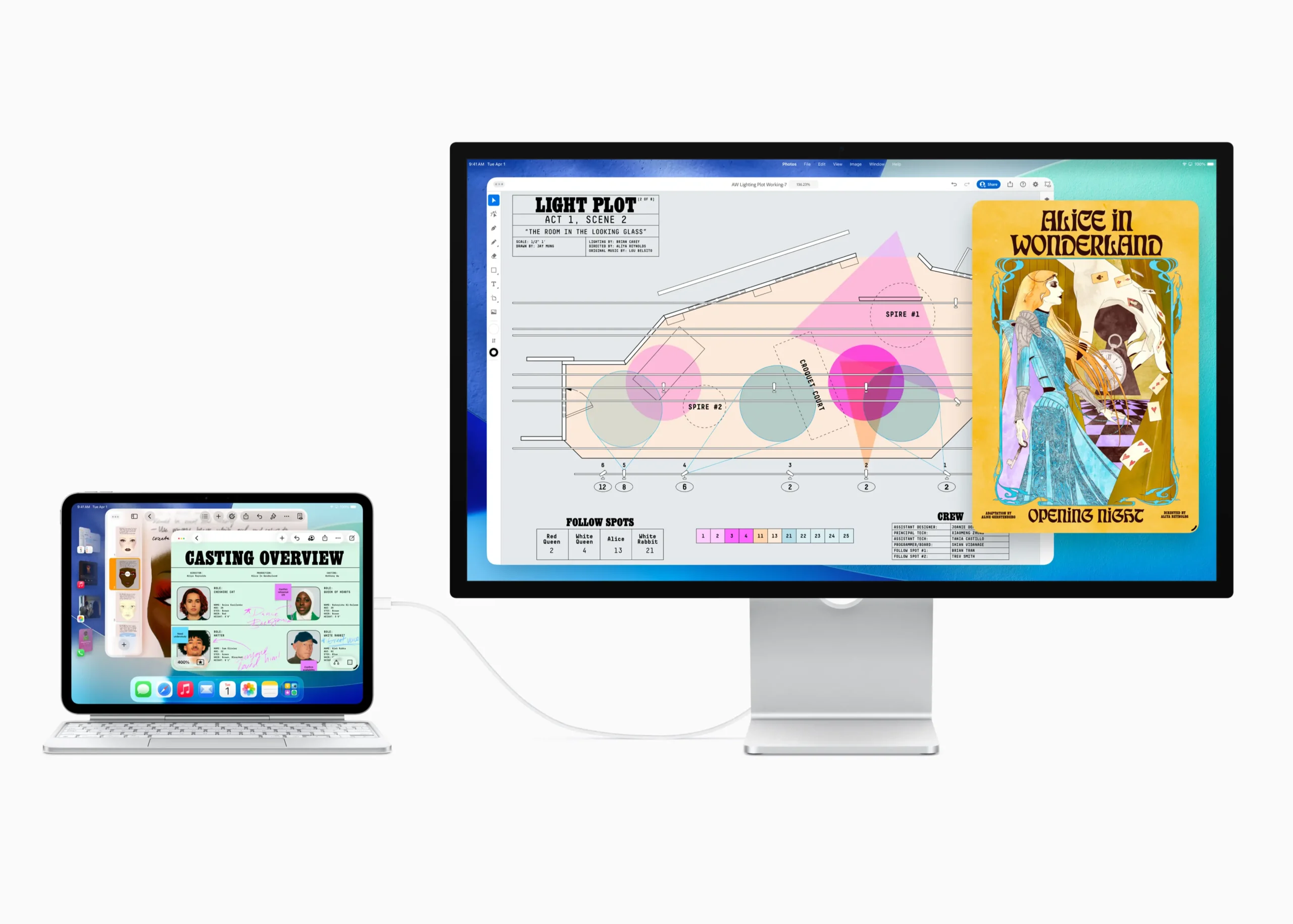
Meanwhile, the Menu bar is a welcome addition that further blurs the line between tablet and desktop. Users can swipe down from the top of the display or move their pointer to reveal app-specific commands, making power tools accessible without cluttering the UI.
Together, these features elevate the iPad from a casual consumption device to a serious workstation — without compromising the immediacy and ease that define iPadOS. For power users and creatives alike, this is the update they’ve been waiting for.
Exposé Makes Multitasking Instantly Clear
Among the standout features in the new iPadOS 26 update, Exposé deserves special attention. It might not carry the headline weight of the windowing system or the menu bar, but in daily use, it’s arguably the feature that makes iPad multitasking finally click.
With a simple swipe or gesture, Exposé instantly spreads out all open windows from the current app, giving users a clean, clutter-free overview of everything they’re working on. Whether you’re writing an email, editing a PDF, or juggling Safari tabs, Exposé eliminates the guesswork of finding the right window. It’s fluid, fast, and built for touch — just tap what you need and get back to work.
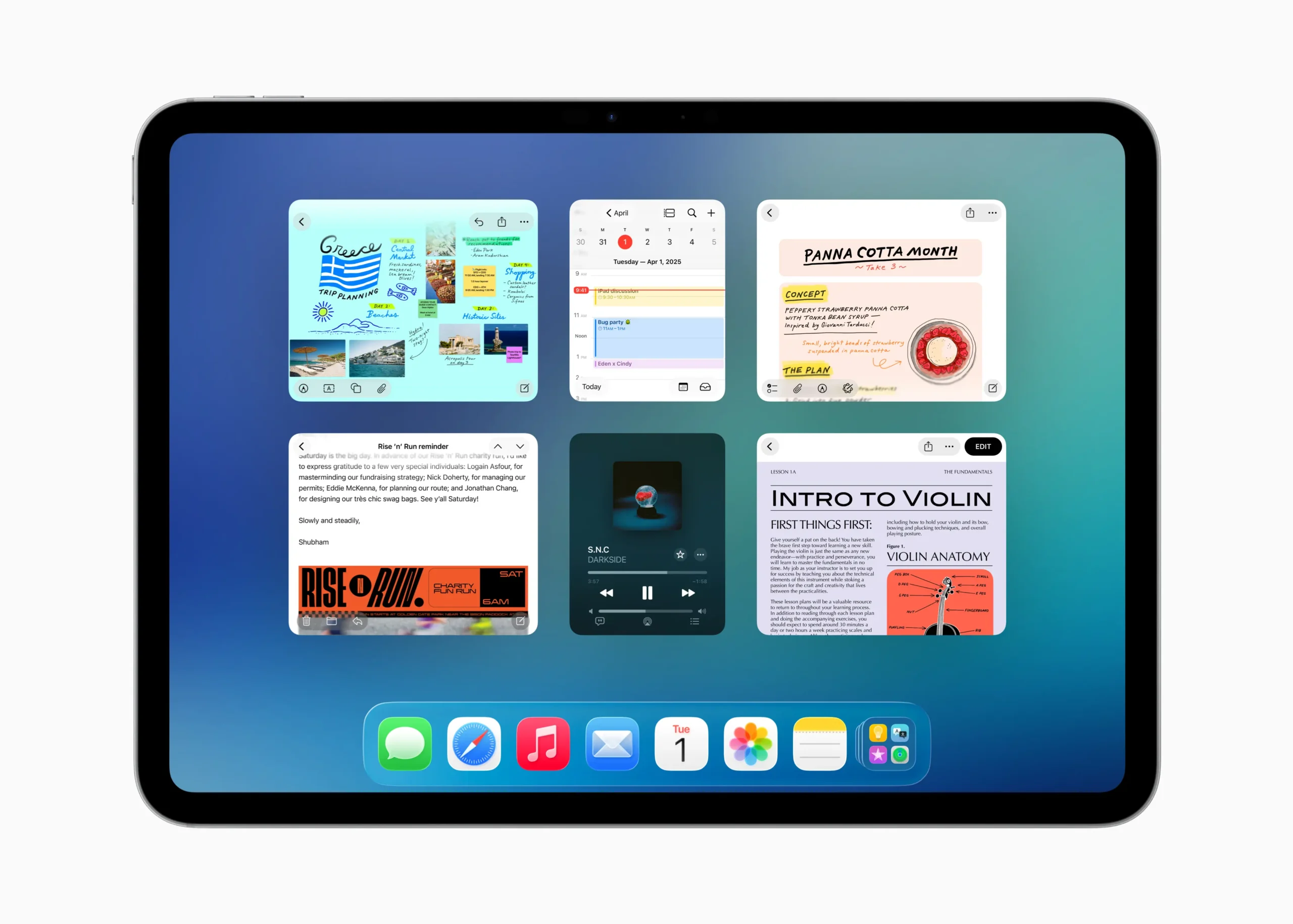
This approach echoes the experience Mac users have long enjoyed, but it’s tailored to iPad’s strengths. The animations are smooth, the window previews are legible and responsive, and everything updates in real time — if a document changes, you’ll see it reflected in the snapshot. Combined with Stage Manager and the new menu bar, Exposé creates a layered multitasking environment that doesn’t overwhelm the user. It clarifies rather than complicates.
Another strength of Exposé is how naturally it integrates into keyboard and pointer workflows. Pressing the Globe key or using a four-finger swipe gives power users instant access without lifting a hand off their accessory. On an external display, it works just as elegantly, adapting to multiple spaces without losing coherence.
For iPad users who have struggled with app-switching in the past — especially those who grew frustrated with the previous multitasking UI — Exposé is a revelation. It doesn’t reinvent how apps work; it simply lays them out in a way that makes sense. For a platform known for its simplicity, that’s exactly the kind of intelligence and refinement the new iPadOS 26 update was made for.
Essential Apps Get Powerful Upgrades
Beyond design and multitasking, the new iPadOS 26 update brings meaningful improvements to the apps and tools that iPad users rely on every day. From productivity staples to creative utilities, Apple has expanded the functionality of built-in apps while introducing new ones that make the iPad even more versatile.
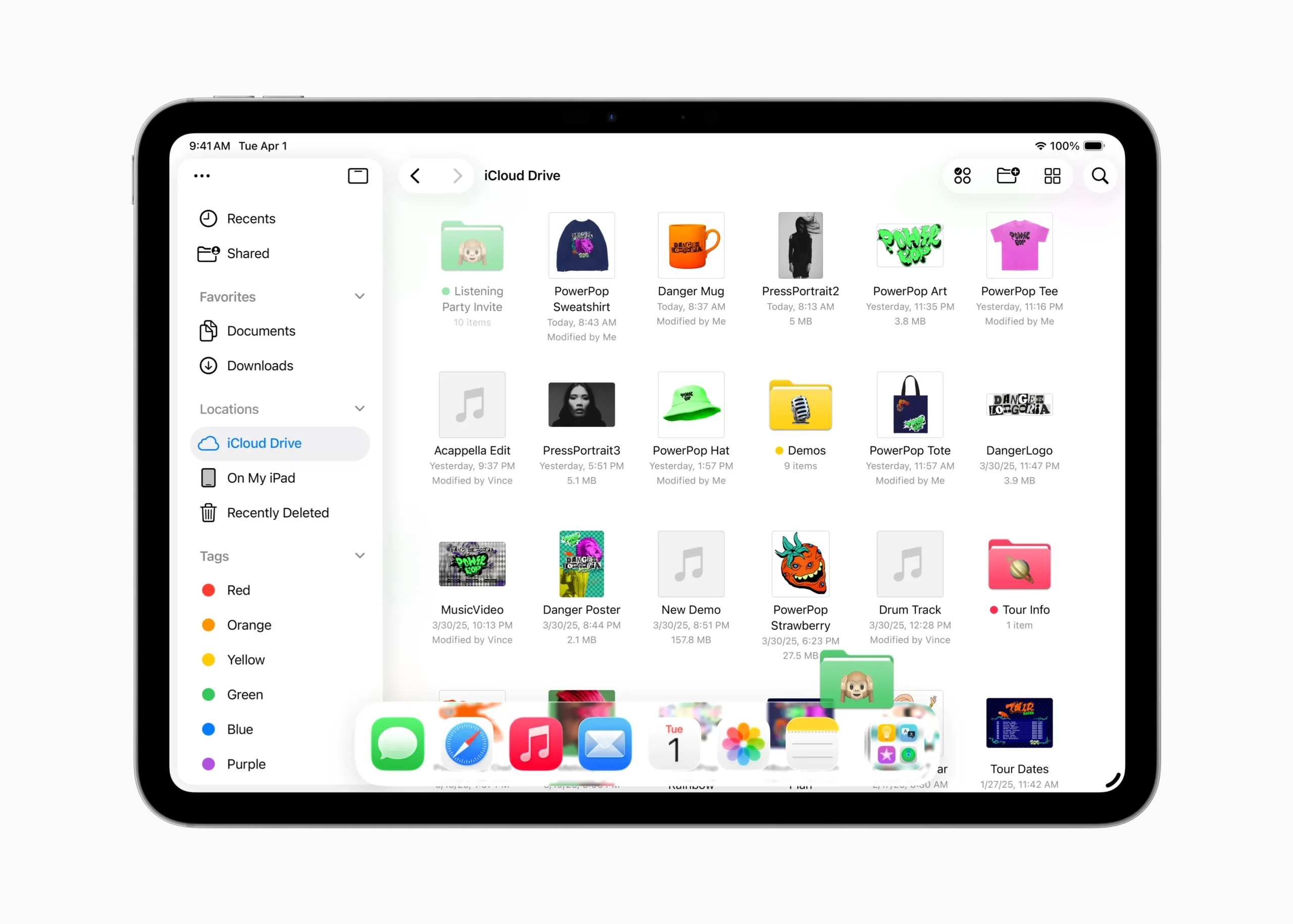
At the center of this expansion is the enhanced Files app, which now features a resizable list view with collapsible folders and detailed file metadata. Users can personalize folders using custom colors, icons, or emoji — changes that sync across devices. Even more convenient is the ability to drag folders into the Dock, providing quick access from anywhere in the system. This brings the file management experience closer to that of macOS, without sacrificing the simplicity that defines iPadOS.
Preview, Journal, and More Arrive on iPad
The Preview app finally lands on iPad, giving users a dedicated space to view, annotate, and edit PDFs and images. Integrated with the Files app, Preview lets users sketch with Apple Pencil, use AutoFill for forms, and draw directly on blank pages. This makes it an indispensable tool for students, business users, and creative professionals alike.
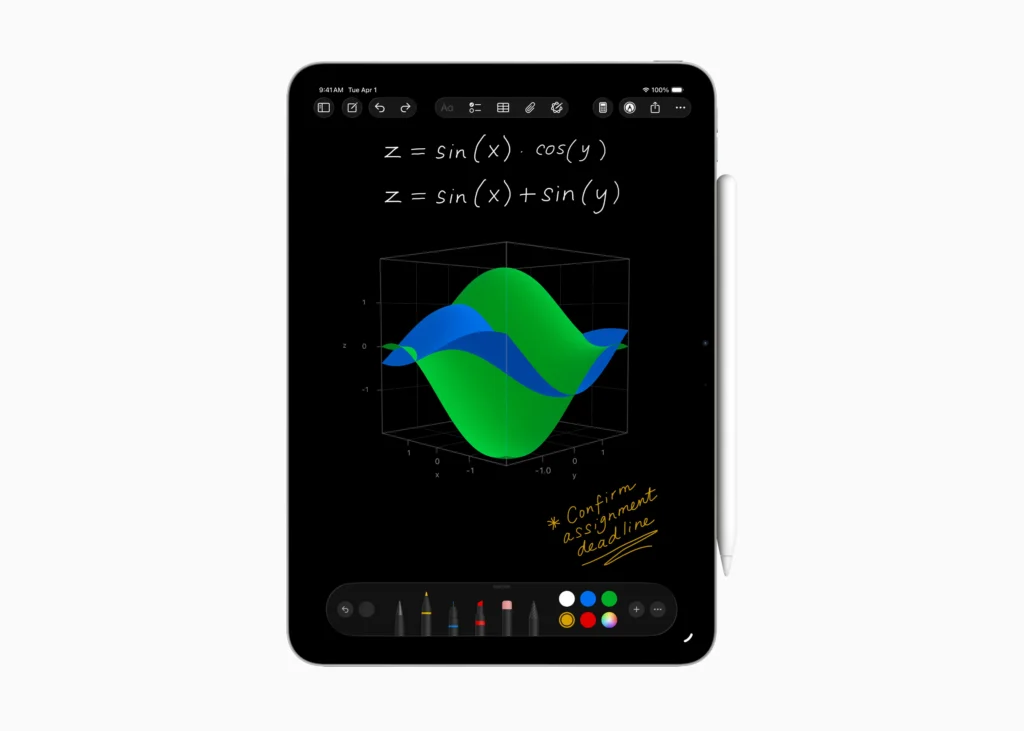
The Journal app, introduced last year on iPhone, now comes to iPad, taking full advantage of the larger display and Apple Pencil. Users can reflect on their day, draw, write, and even map out entries geographically with the new location-based view. Meanwhile, the Calculator app gains advanced 3D graphing in Math Notes, allowing users to plot equations in three dimensions by handwriting expressions with multiple variables.
Messaging also gets smarter with Polls, conversation Backgrounds, and a redesigned info view in Messages. Add in the arrival of the Phone app on iPad — with support for Hold Assist and Call Screening — and it’s clear that Apple has broadened the iPad’s communication capabilities significantly. With these updates, iPadOS 26 becomes not just a better tablet OS, but a more fully featured computing platform.
Apple Intelligence Enhances the Everyday With The New iPadOS Update
While the app upgrades in the new iPadOS 26 update are impressive on their own, they become transformative when powered by Apple Intelligence — Apple’s new personal intelligence system that blends privacy-first AI with deep integration across the OS. iPadOS 26 is where this intelligence starts to feel truly embedded, enhancing both everyday communication and creative workflows without users needing to change how they work.
One of the most powerful new tools is Live Translation, now available across Phone, Messages, and FaceTime. It allows for real-time voice and text translation, complete with spoken feedback and live captions. Group messages are automatically translated into your preferred language, and FaceTime overlays captions in real time without muting the speaker — all while maintaining full user privacy.
Creativity with Genmoji, Playground, and Shortcuts
Apple Intelligence also enables new creative tools, most notably Genmoji and Image Playground. Users can generate custom emojis from descriptions or edit them with personal traits and styles — like accessories or expressions — making every conversation more personal. In Image Playground, you can take that even further: describe a style (e.g., oil painting) or upload a photo, and Apple Intelligence generates a unique image tailored to your input. These tools are built directly into apps like Messages and Contacts, making them feel native to the iPad experience.
In Shortcuts, Apple Intelligence adds a layer of dynamic power — users can now build automations that summarize text, generate images, or analyze content using Apple’s models. For example, a student might create a shortcut that compares their class notes to a transcript and surfaces any missing insights automatically.
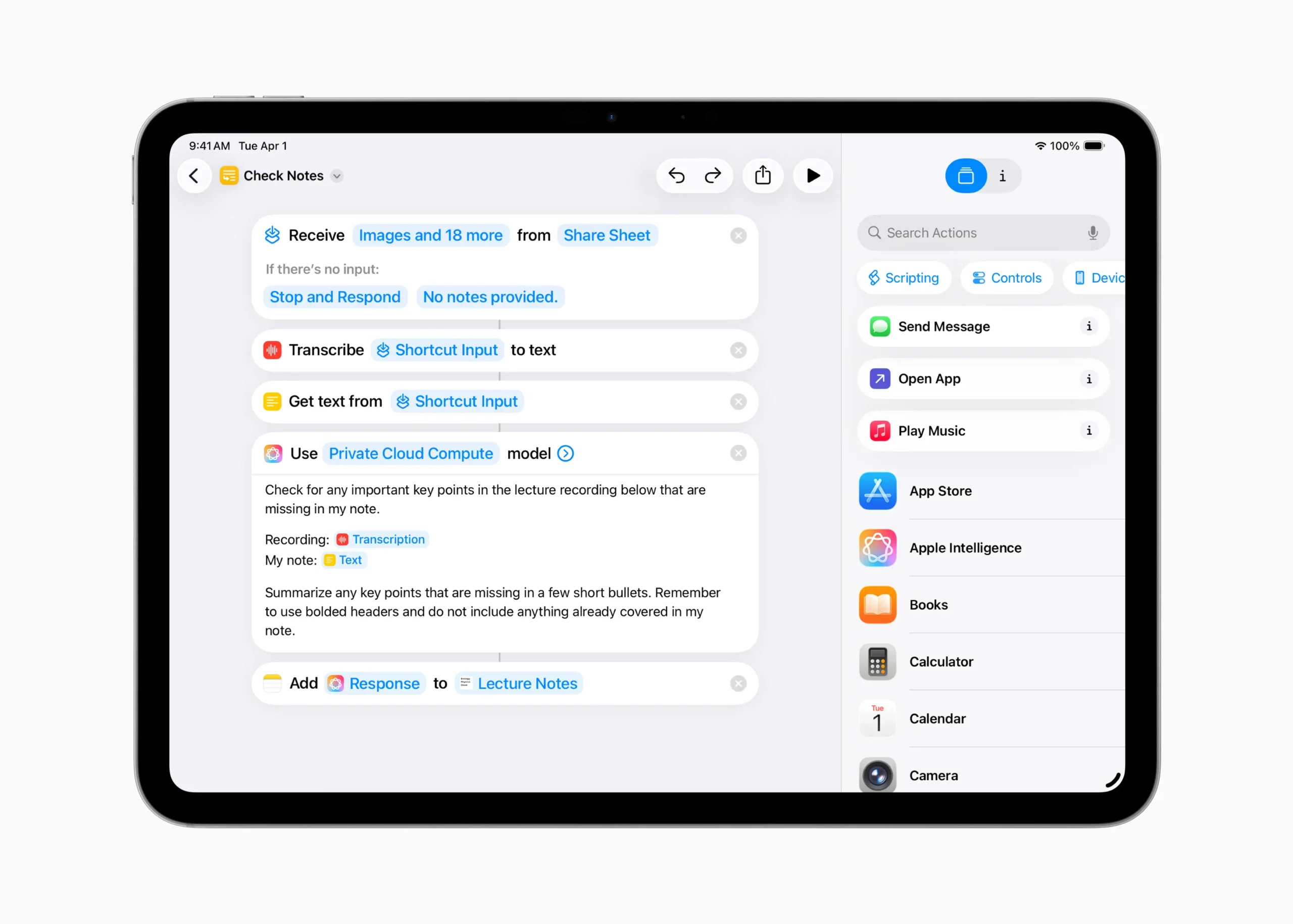
These enhancements aren’t just about novelty — they’re about removing friction and giving users smarter, faster ways to express ideas, get answers, and connect. It’s AI, done the Apple way: helpful, private, and tightly integrated into the tools you already use.
Apple Games App Brings Structure to Play With The New iPadOS 26 Update
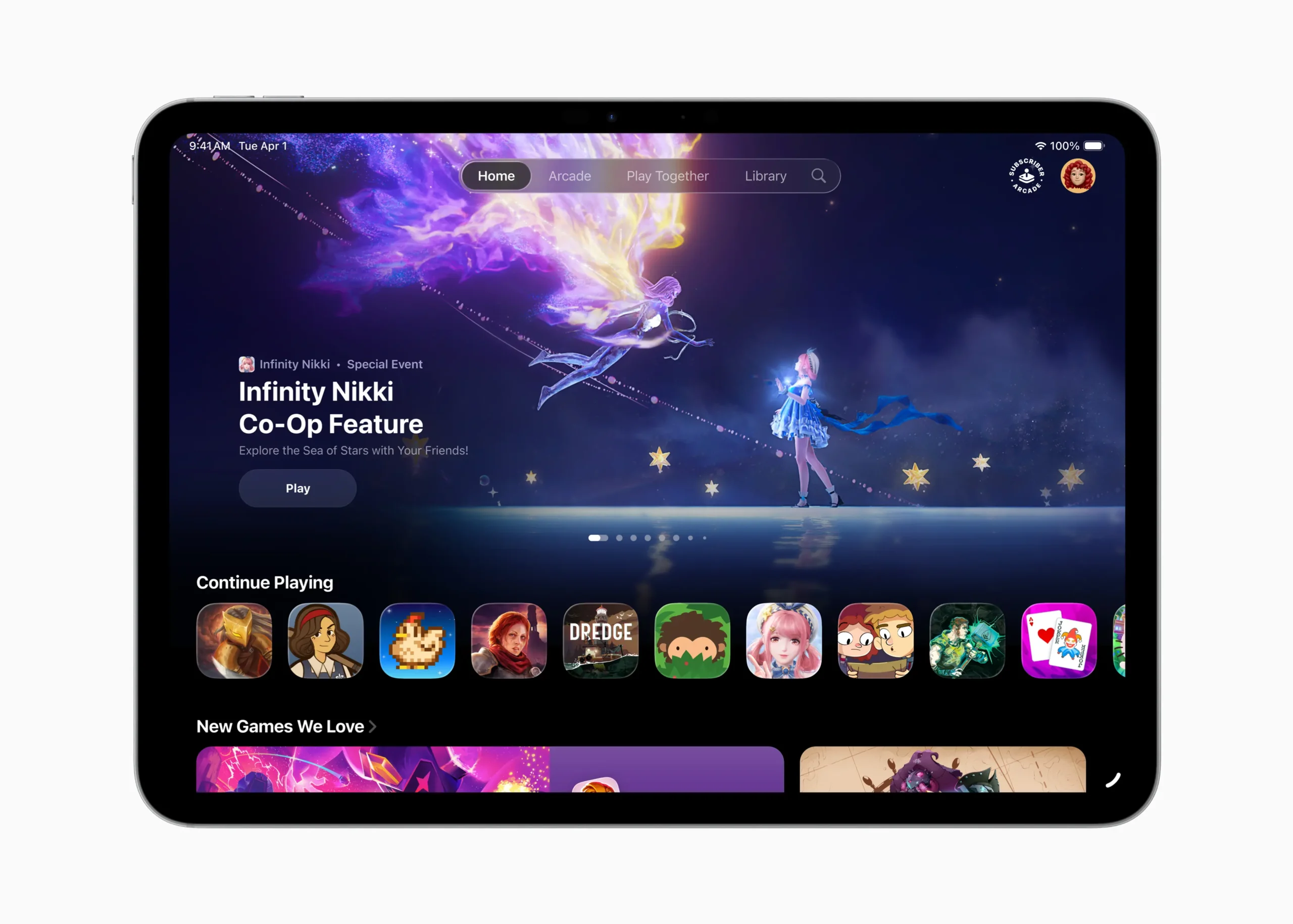
With the new iPadOS 26 update, Apple introduces the Apple Games app — a centralized experience that finally gives gaming on iPad a proper home. Rather than being just a shortcut to Game Center or a launcher for installed games, the app serves as a smart hub for everything related to gaming across Apple’s ecosystem.
Inside the Games app, users can track their current titles, revisit achievements, and view personalized recommendations based on Game Center activity. It also highlights live in-game events, seasonal content, and new updates — a feature that brings iPad gaming closer to console-level engagement. The streamlined layout makes it easy to jump back into a game, tweak settings, or invite friends for multiplayer, all from one intuitive interface.
What’s more, the app integrates tightly with Game Center overlays, making friend requests, real-time activity, and messaging accessible without breaking immersion. Whether you’re on Apple Arcade or using a third-party title, the experience feels unified. Paired with iCloud syncing, controller support, and external display compatibility, the iPad becomes an even more capable gaming device — not just powerful, but organized.
The Games app doesn’t try to reinvent how games are launched or sold. Instead, it provides structure, personalization, and presence — three things mobile gaming has long needed. For casual and dedicated players alike, it’s one of the most quietly useful additions in iPadOS 26.
Creative Power with Audio, Video, and Capture
For creative professionals and content makers, the new iPadOS 26 update delivers features that go far beyond casual use — offering tools that elevate iPad into a powerful production platform. Thanks to Apple Silicon and new system-level capabilities, users can now manage complex media workflows with ease, whether they’re recording podcasts, producing video content, or livestreaming on the go.
One of the standout additions is support for Background Tasks, which allows long-running processes — like rendering, uploading, or exporting — to continue uninterrupted. These tasks appear as Live Activities, giving users real-time feedback and control from the Lock Screen or Home Screen. Developers also gain access to a new Background Tasks API, enabling richer workflows in third-party apps without draining resources or requiring active app time.
Smarter Audio Input and Studio-Quality Recording
Audio input gets a major upgrade as well. Users can now choose specific microphones for each app, or even for individual websites in Safari. This is perfect for scenarios like recording in Logic Pro while video conferencing in a separate app, each with its own mic source. Voice Isolation also makes its way to recording, suppressing background noise to deliver clean, focused vocals.
If you’re using AirPods Pro 2 or the newly introduced AirPods 4 with ANC, you’ll benefit from studio-quality audio capture — ideal for content creators recording interviews, voiceovers, or remote podcasts directly on iPad.
Another powerful addition is Local Capture, which allows high-quality recording of both audio and video streams directly from conferencing apps. This includes features like echo cancellation, so your voice remains front and center, even if other participants are speaking.
Combined, these features position iPadOS 26 as more than a mobile OS — it’s now a serious tool for creation, ready for pro-grade audio production and video work without the need for a Mac.
The New iPadOS 26 Update Brings Built-In Features for Everyone
While much of the new iPadOS 26 update focuses on power users and professionals, Apple has ensured that this release is just as meaningful for everyday users and those who rely on accessibility tools. With thoughtful additions across Notes, Math, handwriting tools, and inclusive design features, iPadOS 26 continues Apple’s mission to make technology useful for everyone.
The reed pen is one of those quiet but elegant upgrades — it brings a calligraphy-inspired writing tool to apps like Notes, Preview, Freeform, and Journal. Designed to mimic traditional ink stroke angles, it lets users write with flourish, whether they’re marking up a PDF or journaling with Apple Pencil. Artists and handwriting enthusiasts alike will appreciate its expressiveness and precision.
As we mentioned before, the Calculator app newly enriched with Math Notes, introduces 3D graphing. Now users can sketch equations with three variables and instantly visualize complex graphs in three dimensions. It’s not only a huge leap for students and engineers — it also reflects the broader evolution of the iPad from a content consumption device to a dynamic learning and productivity platform.
Accessibility That Adapts to You
Apple has also expanded its accessibility features in iPadOS 26. The all-new Accessibility Reader offers a systemwide reading mode that improves legibility for users who are blind, have low vision, or experience difficulty with traditional text presentation. It works across apps and webpages, tailoring contrast, typefaces, and spacing for greater ease of use.
There’s also Braille Access, a modernized interface for users with connected braille displays. It simplifies navigation and customization, and integrates with the new menu bar and windowing system. Another standout is Share Accessibility Settings, which allows a user to temporarily apply their custom accessibility preferences on someone else’s iPad — a thoughtful touch that reflects Apple’s attention to real-life scenarios.
From stylus enhancements to systemwide inclusion, these updates show that iPadOS 26 isn’t just about doing more — it’s about making sure more people can do everything the iPad has to offer.
What’s New for Developers With The New iPadOS 26 Update
The new iPadOS 26 update isn’t just a leap forward for users — it’s a powerful new chapter for developers building for the iPad ecosystem. With updated APIs, deeper Apple Intelligence integration, and a more flexible multitasking environment, Apple has given developers the tools to create apps that are smarter, more adaptive, and closer to the Mac experience than ever before.
At the core of this evolution are the new windowing and menu bar APIs. Developers can now define how windows behave across multitasking modes, including custom tiling behavior, persistent size memory, and dynamic stage grouping via Stage Manager. With access to the Menu bar, apps can surface commands, tips, and features without cluttering the main interface — and even respond to systemwide search inside the bar itself. It’s a big step toward bringing pro-level workflows to iPad, especially when apps are used in full-screen or with external displays.
Intelligence, PencilKit, and Background Tasks
On the Apple Intelligence front, developers can now tap into Apple’s on-device models through new frameworks in Xcode 16 and Swift 6.2. These models enable private, performant tasks like summarizing, text generation, or image creation directly inside apps. Apps that integrate with the updated App Intents framework can now invoke system intelligence mid-action — for example, summarizing input text before passing it along to another service, or generating custom images via Image Playground.
PencilKit has been enhanced to support the reed pen, and developers can now add handwriting tools with advanced stroke options and color handling. This makes note-taking, journaling, and art apps feel even more natural and responsive.
Finally, the Background Tasks API has been upgraded, allowing developers to queue long-running processes that remain active outside the app foreground. These tasks now display as Live Activities, giving users visibility and control while preserving system performance.
In short, iPadOS 26 opens new creative, intelligent, and performance frontiers for developers — empowering them to build apps that feel native, powerful, and deeply integrated into everything the iPad can now do.
The New iPadOS 26 Update Is Definitely The Most Powerful iPad Update Yet
With the new iPadOS 26 update, Apple hasn’t just added features — it’s crafted an experience that adapts, responds, and resonates on a deeply personal level. Whether you’re a student annotating PDFs, a developer fine-tuning AI-enhanced workflows, or a creator balancing calls and recordings on the fly, iPadOS 26 feels designed for you — the individual behind the screen.
Liquid Glass gives your interface personality. The new windowing system gives your workspace freedom. Intelligence adds support when you need it, and stays respectfully in the background when you don’t. Even the smallest touches — like the reed pen in Notes or folder colors in Files — are designed to reflect the way you think, create, and communicate.
This update also brings the iPad closer than ever to Apple’s broader ecosystem. The menu bar, external display support, and developer APIs inch the platform nearer to macOS in capability, while maintaining the immediacy and ease of touch that makes iPad unique. It’s no longer about bridging the gap — it’s about redefining what a personal computing experience can look like when the lines between desktop and tablet dissolve.
With iPadOS 26, Apple has delivered a release that’s both powerful and personal — a blend of technical prowess and human-centric design. It meets users where they are, and gives them the tools to go even further. For anyone wondering whether the iPad is still evolving: this update is your answer.
