
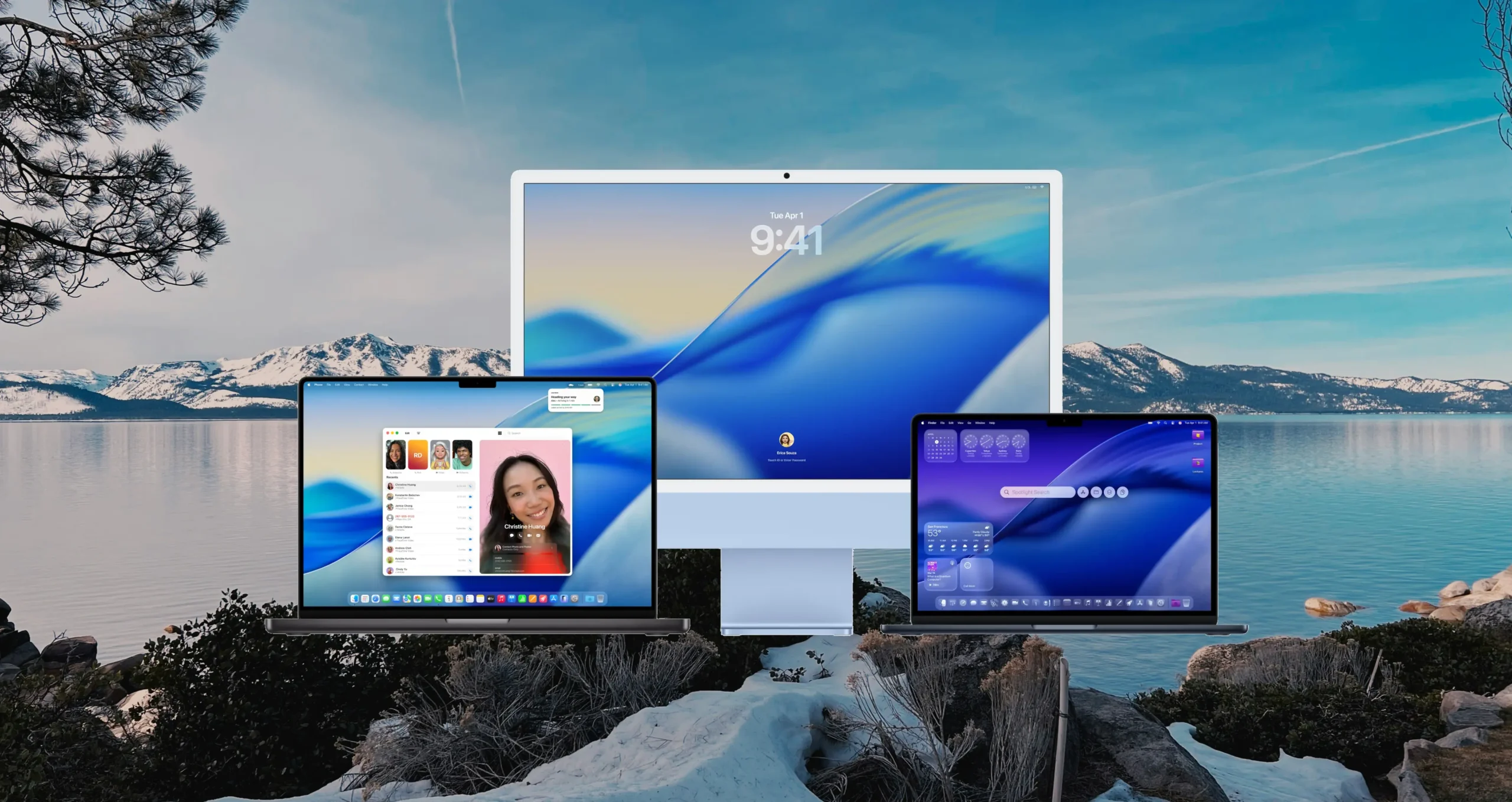
Apple’s macOS Tahoe is more than just the next macOS update — it’s a bold new step in how the Mac looks, feels, and works. Announced during WWDC 2025, this latest release elevates personalization, performance, and intelligence across the system, setting the stage for a smarter, more seamless Mac experience. Built on the solid foundation of macOS Tahoe 26, it introduces a refreshed interface, advanced Apple Intelligence tools, and new continuity features that bridge the Mac and iPhone more tightly than ever.
For Mac users, familiar workflows are now enhanced with thoughtful design touches and intuitive capabilities. From the liquid-like clarity of the new UI to the biggest update Spotlight has ever received, macOS Tahoe adds polish where it matters and power where it counts. It’s both distinctly Apple and freshly refined — blending beauty, speed, and intelligence into every interaction.
Whether you’re organizing files, making calls, building shortcuts, or just browsing the web, this version of macOS brings quiet but meaningful improvements to your everyday experience. At its core, macOS Tahoe is designed to make the Mac more expressive, helpful, and personal — all while maintaining Apple’s commitment to privacy and device performance.
We’ll explore each of the major areas where Apple has upgraded the Mac — starting with the redesigned interface and personalization options that set the tone for the entire release.
A Stunning Redesign, Crafted with Liquid Glass
macOS Tahoe introduces one of the most visually significant updates in recent Mac history. The interface has been completely refreshed using a new material system called Liquid Glass, which gives elements like the Dock, sidebars, and toolbars a sense of translucency, depth, and visual harmony. It reflects and refracts the environment behind it — creating a fluid, dimensional feel that subtly adapts to content and context.
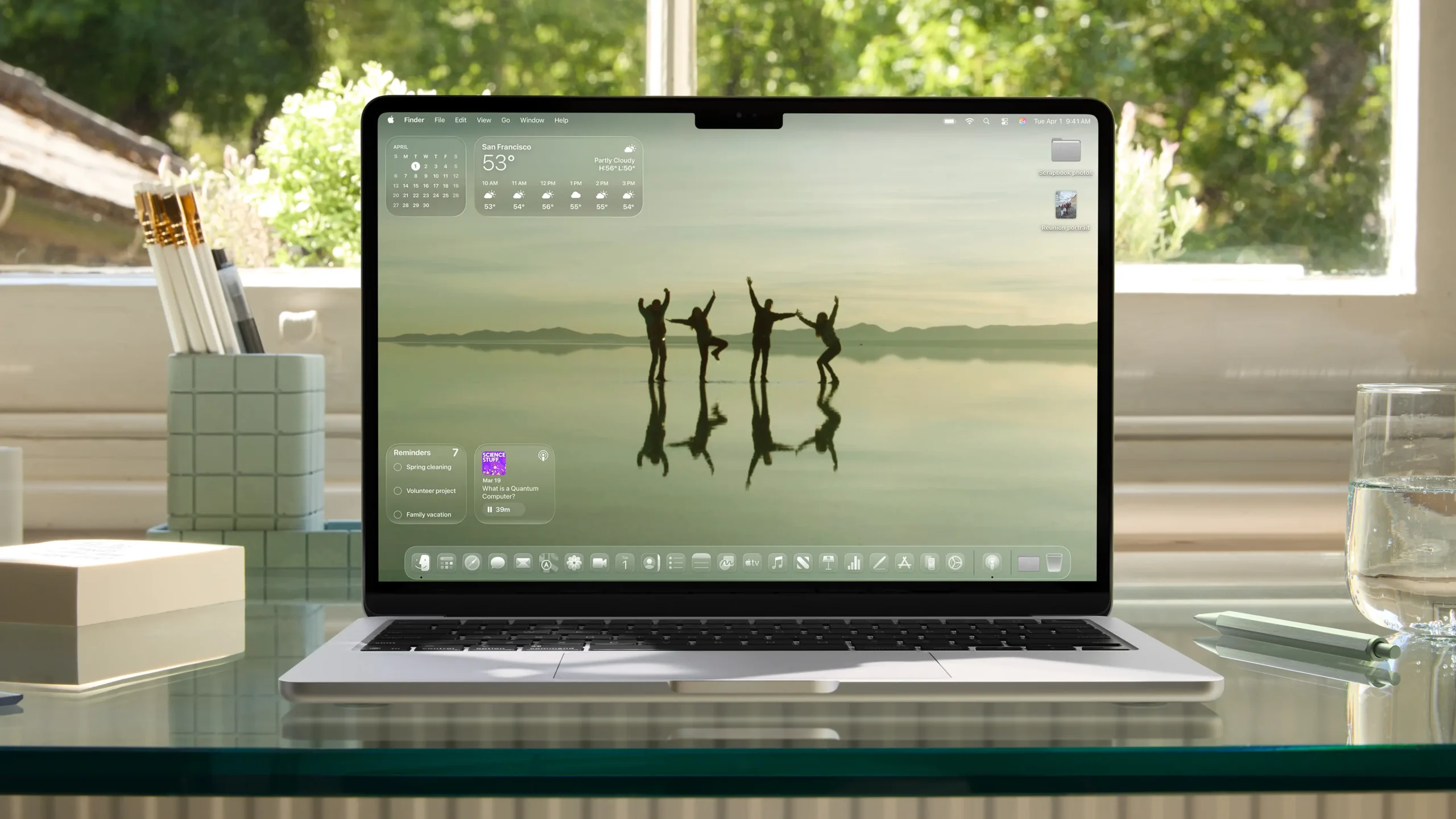
Yet, this isn’t a radical departure. The Mac still feels unmistakably like a Mac. The new design is familiar but more polished, putting user content at the center. The menu bar is now fully transparent, visually extending the screen while keeping system status accessible. Sidebars and app toolbars have been simplified and unified, with spacing and typography optimized for clarity and focus.
Customization also takes a leap forward. Users can now personalize app icons, not just with light and dark modes but with colorful tints and a new “clear” appearance. Folder icons support custom colors and symbols — including emoji — allowing users to express style and improve at-a-glance organization. The updated Control Center is now more configurable too, letting users choose what controls appear and how they’re laid out.
Even wallpapers play a bigger role in setting mood and identity. Combined with theme colors and icon styling, macOS Tahoe 26 makes it easier than ever to create a truly personalized desktop experience that feels cohesive and expressive — something that previously required third-party tools or workarounds.
This focus on thoughtful design isn’t just about beauty; it’s about giving users control, clarity, and joy in everyday interactions. Next, let’s explore how these changes work in sync with Apple’s expanded continuity features.
Spotlight Gets Its Biggest Update Yet
Spotlight has always been one of macOS’s quiet power tools — a universal search bar that opens apps, finds files, runs calculations, converts currencies, checks the weather, and more. It’s fast, keyboard-driven, and tightly integrated across the system. But with macOS Tahoe, Apple takes Spotlight from a clever utility to a full-blown command center, offering more intelligence, interactivity, and personalization than ever before.
The first major change is how results are organized. In previous versions of macOS, Spotlight often returned results in separate categories — apps, documents, emails, dictionary entries — forcing users to scan through blocks of suggestions. In Tahoe, all results are now intelligently ranked in a unified list, based on relevance and user behavior. This means if you always open Pixelmator or search for specific project folders, those results will naturally surface to the top.
Spotlight now supports powerful new filtering tools, allowing users to quickly narrow results by file type, source, or date. You can filter by PDFs, Mail messages, or even documents stored on third-party cloud drives. These enhancements make Spotlight not only faster, but more precise — great for professionals handling large volumes of data or files.
Another massive upgrade: actionable results. In Tahoe, Spotlight supports direct actions — users can send an email, start a timer, create a calendar event, play a podcast, or even write a note — right from the search interface. This works with Apple’s own apps and any third-party apps that support the App Intents API, which means the scope of Spotlight’s usefulness will grow rapidly as developers adopt the new standard.
Spotlight also gains Browse Views, a new interface for discovery. If you’re unsure what to search for, you can now scan through your installed apps, recent files, clipboard history, or even common actions — a helpful new layer of visibility that turns Spotlight into a kind of interactive dashboard.
To complement this, Apple has introduced Quick Keys — short string inputs (like “em” for Email or “nt” for Note) that jump directly to actions or categories. This small change makes a big difference in speed for keyboard-focused users.
Perhaps the most impressive addition is Spotlight’s contextual intelligence. It learns your routines, like whom you message frequently or which documents you open at certain times, and surfaces personalized shortcuts. These aren’t static suggestions — they evolve based on how you use your Mac.
Whether you’re a casual user looking to launch apps and check the weather, or a power user streamlining dozens of tasks per day, Spotlight in macOS Tahoe 26 is your new command line — only it’s beautiful, intelligent, and always just a keystroke away.
Apple Intelligence Expands on Mac in Powerful New Ways
With macOS Tahoe, Apple deepens its commitment to private, device-integrated AI through major new updates to Apple Intelligence. These features aren’t about flashy gimmicks — they’re designed to be practical, helpful, and invisible until you need them. They respect user privacy by running on-device whenever possible and use Private Cloud Compute when more power is required, without compromising data security.
At the core is Live Translation, which brings real-time multilingual communication to Messages, FaceTime, and even phone calls. It automatically translates incoming and outgoing messages as you type or speak, with translations appearing inline in the recipient’s language. On FaceTime, translated captions appear live while maintaining the original audio, helping users follow conversations with clarity. Even voice calls can be translated mid-call, making cross-language communication seamless and private.
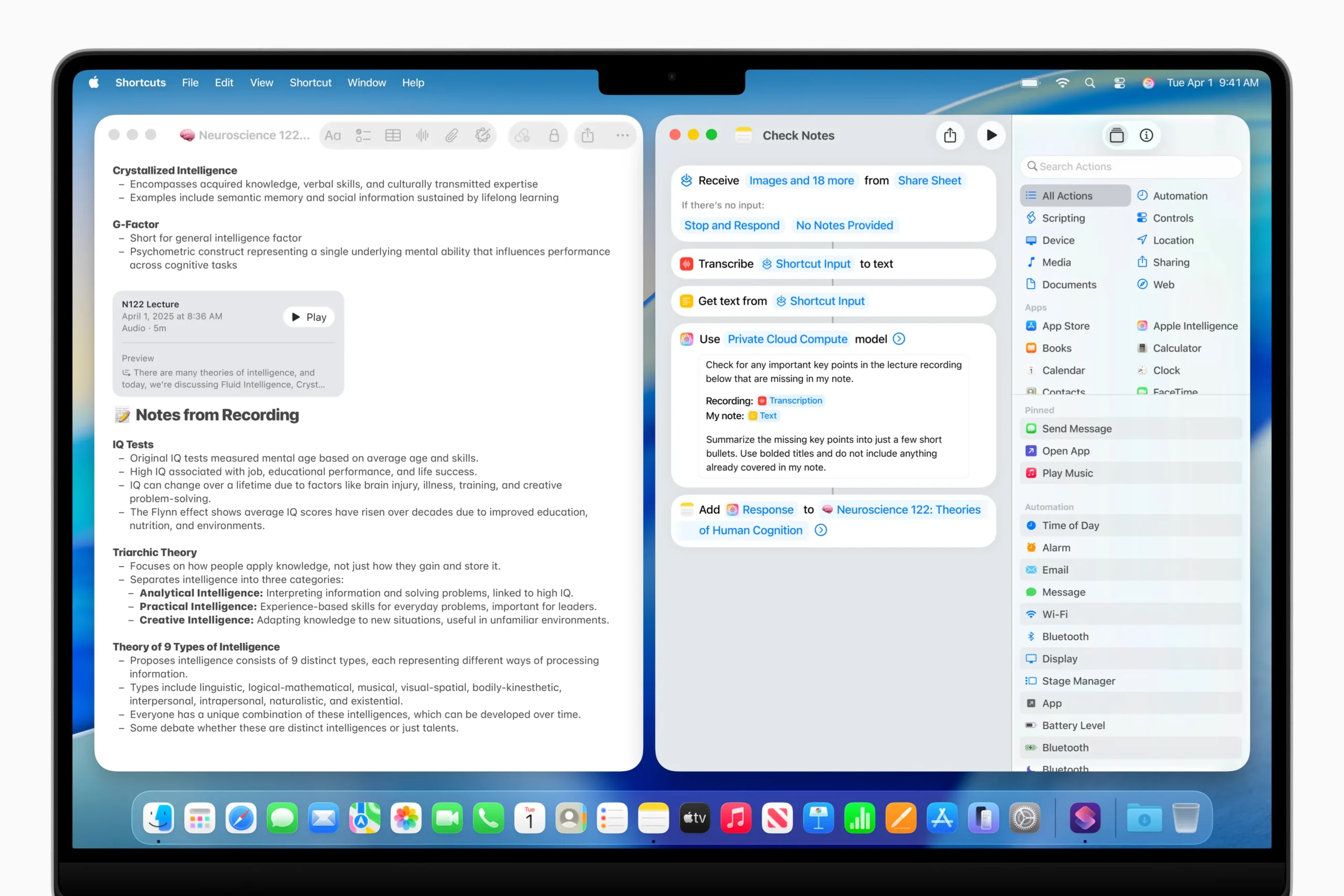
Shortcuts become dramatically smarter thanks to Apple Intelligence. Users can now tap directly into Apple’s language models to perform advanced tasks. For example, a student can create a shortcut that compares a lecture’s audio transcript to their notes and highlights missed points. These models can also summarize text, generate creative images with Image Playground, and even connect to ChatGPT when broader world knowledge is needed. Crucially, all this intelligence can be embedded in automated workflows that run at set times or in response to specific user actions, like connecting a display or saving a file.
Personalization is also central to Genmoji and Image Playground. In Tahoe, users can generate custom emojis starting with a base expression or emoji, tweaking traits like hairstyle, clothing, and accessories to reflect a mood or context. Image Playground expands style control with options like oil painting, vector art, or even Any Style — which lets users describe the style they want in natural language.
And because productivity remains a top priority, Reminders now work with Apple Intelligence to scan the content of emails, notes, or webpages and identify action items, organizing them into categorized lists automatically. This cuts down on manual sorting and helps users stay on top of important tasks with far less effort.
Apple’s privacy-first approach means that these features don’t require sending personal data to the cloud — and when they do, it’s done with encrypted identifiers and strict protections. For users on M1 and newer Macs, the power of Apple Intelligence in macOS 26 is now not only helpful — it’s foundational.
Continuity Makes the Mac and iPhone More Seamless Than Ever
One of the defining strengths of Apple’s ecosystem is how effortlessly its devices work together — and with macOS Tahoe, Continuity gets its biggest boost yet. These new features are designed to eliminate friction, turning your iPhone and Mac into extensions of the same experience, rather than separate tools.
The star addition is the full Phone app on Mac. For years, Mac users could relay phone calls through their iPhone, but macOS Tahoe introduces a true native experience. The Phone app looks and behaves just like its iPhone counterpart, with access to Recents, Favorites, Contacts, and Voicemail — but now enhanced with two powerful, iPhone-exclusive features: Call Screening and Hold Assist.
Call Screening automatically answers unknown callers with a prompt, asking them to identify themselves. The transcript is shown in real-time, giving users the option to answer or decline based on context. For busy users and professionals, this can be a game-changer in separating spam from important calls without interruptions.
Hold Assist, meanwhile, is tailor-made for customer service queues. When you’re stuck on hold, the Mac will keep your spot in line while you go back to work — and notify you when a human is finally on the line. It’s a deceptively simple feature that brings real utility to everyday frustrations.
Another exciting upgrade is the arrival of Live Activities from iPhone on the Mac. These are the glanceable, real-time widgets iPhone users see on the Lock Screen or Dynamic Island — like your Uber’s ETA, flight updates, or live sports scores. Now, these appear in the menu bar of macOS Tahoe, where they can be clicked to open the corresponding app via iPhone Mirroring. This transforms the Mac into a control center for real-world events without even unlocking your phone.
These updates deepen the tight bond between Mac and iPhone, reflecting Apple’s broader vision: a platform that adapts to the user, not the other way around. With macOS 26, the Mac no longer just works well with the iPhone — it feels like part of it.
Built-In Apps Get Smarter, Faster, and More Capable
macOS Tahoe doesn’t just introduce a new design and deeper intelligence — it brings powerful upgrades to the apps Mac users rely on every day. From web browsing to journaling, messaging to gaming, the system-wide enhancements make these experiences more fluid, personal, and productive. These changes aren’t just cosmetic — they significantly expand what users can do, how fast they can do it, and how deeply integrated each app feels in the overall macOS experience.
Safari: A Faster, Smarter Browser with Better Privacy
Safari in macOS 26 gets both a visual refresh and under-the-hood improvements that make it the fastest browser on macOS. Tabs now float more freely with a rounded design that gives them a subtle 3D effect in the toolbar, enhancing readability and navigation. The sidebar has been overhauled with smarter organization, making features like iCloud Tabs and Reading List more accessible.
Apple reports Safari is now 50% faster than Chrome at loading frequently visited sites, and it also provides up to four extra hours of battery life during video playback — a major win for MacBook users. For privacy-conscious users, Safari now applies advanced fingerprinting protection across all browsing modes by default, blocking even more attempts by trackers to identify your device.
Messages, Notes, Photos, and Journal
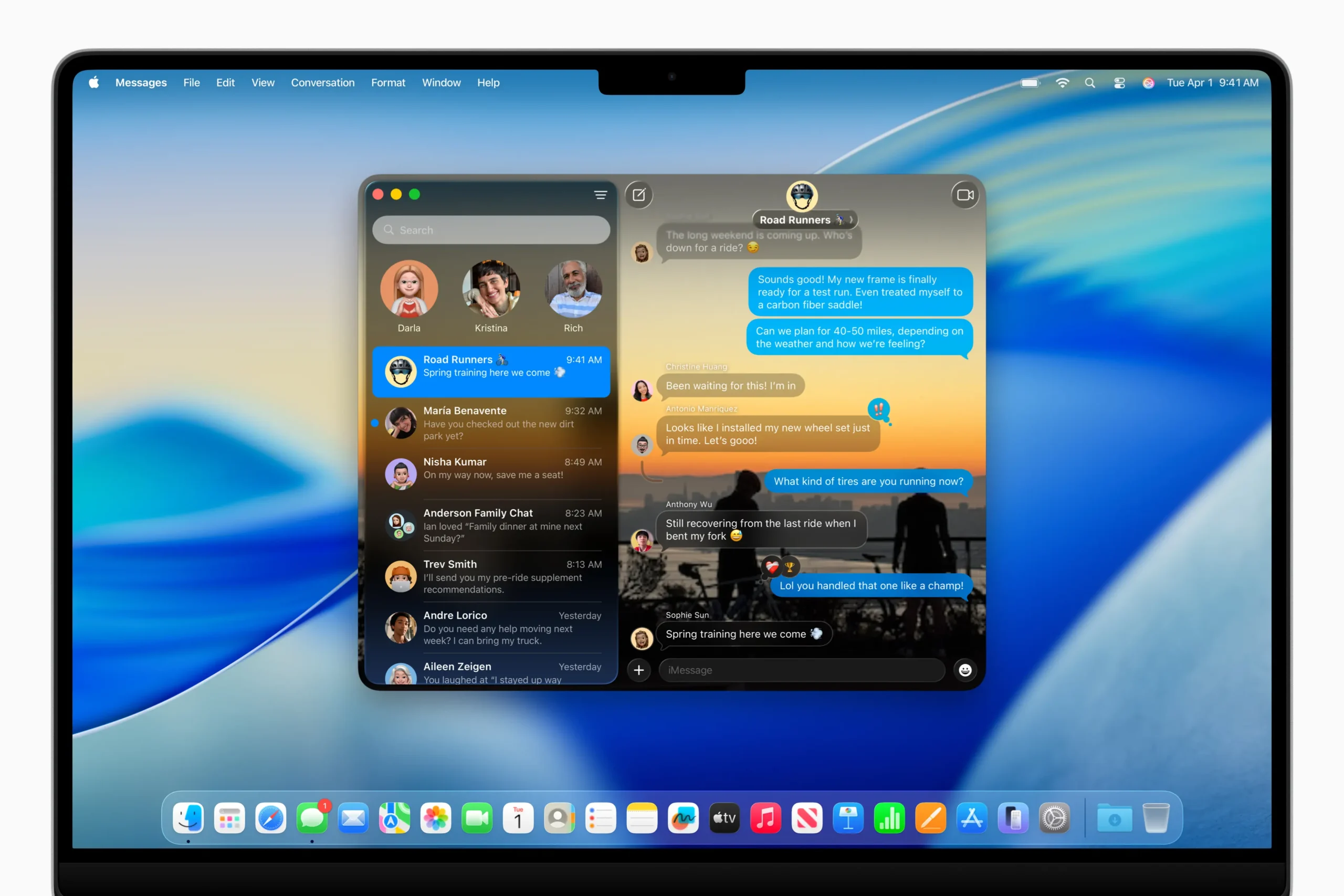
The Messages app continues evolving into a full-featured communication hub. New features include Backgrounds, allowing users to personalize chats with stylish visuals; Polls, which add interactive decision-making to group threads; and typing indicators for group conversations, showing exactly who’s composing a reply. A redesigned detail view also makes it easier to manage shared content.
In Notes, users can now import and export notes as markdown files — ideal for cross-platform workflows — and even capture phone conversations as transcribed audio recordings, useful for interviews or research.
The Photos app receives a visual upgrade thanks to the Liquid Glass UI, plus improvements to workflow. A more consistent sidebar matches iPadOS, and Pinned Collections make frequently accessed albums instantly available. Filtering and sorting are now just a click away, and users can resize Collection tiles for a more tailored viewing experience.
Journal arrives on Mac for the first time, offering users a dedicated space to write, reflect, and record daily life. Multiple journals can be kept for different purposes — whether travel logs or wellness goals — and entries can now be viewed on a map for a richer visual context.
Accessibility and System Tools Built for Everyone
macOS Tahoe is one of Apple’s most inclusive releases ever. Magnifier on Mac brings enhanced zooming via Continuity Camera or connected USB webcams, with adjustable filters and perspectives for better visibility of physical content like presentations or books.
Accessibility Reader introduces a clean, systemwide reading mode tailored for users with visual or cognitive impairments, while Braille Access debuts an all-new interface for connected braille displays — a major improvement for blind users.
Vehicle Motion Cues address motion sickness in moving vehicles by subtly animating UI elements to counterbalance the visual dissonance caused by motion. It’s a thoughtful, science-backed addition that shows how deep Apple’s accessibility work goes.
Passwords gets smarter too, now letting users track past changes and see when a saved password was modified — a small but vital boost to digital security management.
A Major Push Forward for Mac Gaming
Gaming has long been a frontier where Apple aimed to improve — and with macOS Tahoe, the company is making its biggest push yet. The all-new Apple Games app gives users a dedicated hub to manage titles, discover new releases, and stay connected with friends. It’s a full ecosystem upgrade that makes the Mac feel more like a gaming-native platform.
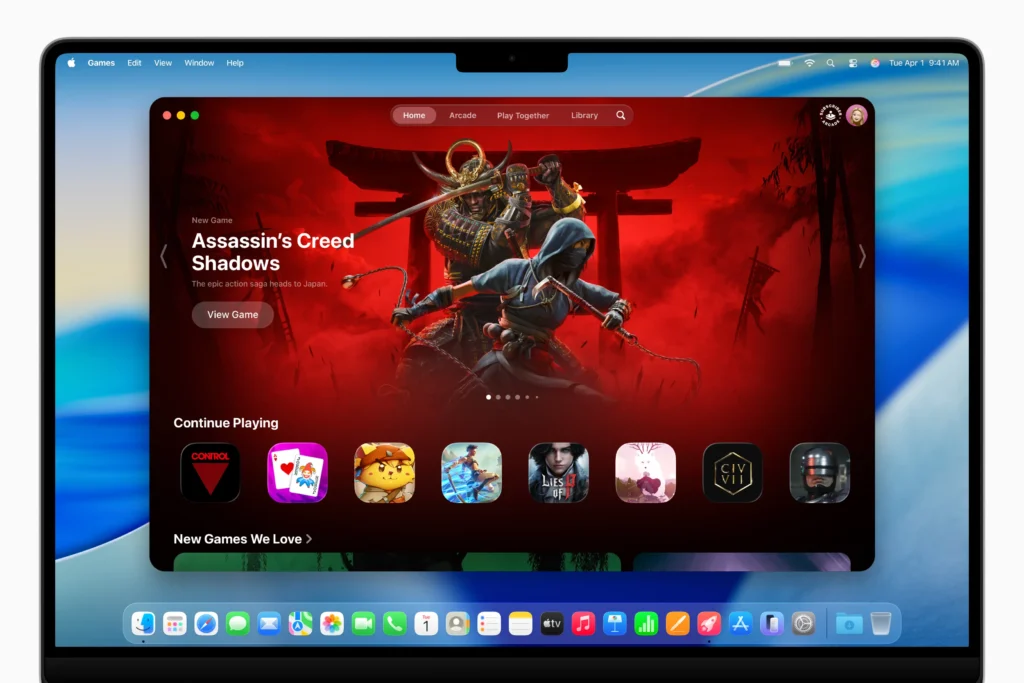
Game Overlay keeps players immersed while offering quick access to system settings, friends, chats, and In-App Events without ever leaving the game. It even includes Low Power Mode to stretch gaming time on battery.
Under the hood, Metal 4 brings next-gen rendering tools like MetalFX Frame Interpolation (which inserts intermediate frames for smoother motion) and MetalFX Denoising (which enables real-time ray tracing and path tracing). These improvements help Macs with M3 and M4 chips punch far above their weight in graphical fidelity.
New titles like Cyberpunk 2077, Lies of P: Overture, Crimson Desert, and HITMAN World of Assassination are finally making their way to Mac, signaling a growing confidence among developers. Thanks to these technical leaps, gaming on Mac is no longer an afterthought — it’s a serious part of Apple’s platform future.
A New Era for Mac: Smarter, More Personal, and Unmistakably Apple
macOS Tahoe is more than a routine update — it’s a definitive statement on the Mac’s future. With its refined Liquid Glass design, powerful Apple Intelligence integration, and thoughtful system-wide upgrades, macOS 26 turns everyday tasks into something more seamless, intuitive, and personal. From the beautifully redesigned Safari to Live Translation and Genmoji, to Spotlight’s newfound superpowers, Apple is enhancing the core Mac experience without losing what makes it familiar and beloved.
Continuity features like the new Phone app and Live Activities make your iPhone and Mac feel more like one device. Meanwhile, the explosion of new capabilities in built-in apps — especially for journaling, messaging, and gaming — shows just how far macOS has evolved from being a desktop workhorse to becoming an intelligent, expressive, and dynamic platform.
macOS Tahoe reinforces Apple’s commitment to making the Mac a platform where productivity, creativity, and personal connection come together. And as it rolls out this fall, it’s clear that this is not just an update — it’s a leap forward for the entire Mac experience.
