

Apple’s latest Mac Studio update creates a tough choice for professionals. The debate over the Mac Studio M4 Max vs M3 Ultra is not a simple one. It is, in fact, a complex choice between two power designs. The M4 Max chip uses Apple’s newest hardware architecture, which in turn delivers amazing single-core speed. This design makes it a great option for fast performance.
The M3 Ultra is, on the other hand, a leader in parallel tasks. Apple built this chip by fusing two M3 Max chips. This design therefore gives it double the CPU and GPU cores. It also has twice the memory and bandwidth. This results in group-task speeds the new chip cannot match. Its raw power is thus key for heavy 3D work.
The choice in the end rests on these core contrasts. These changes directly impact app speed, and knowing them is therefore key. Making a smart buy truly depends on your specific work needs.
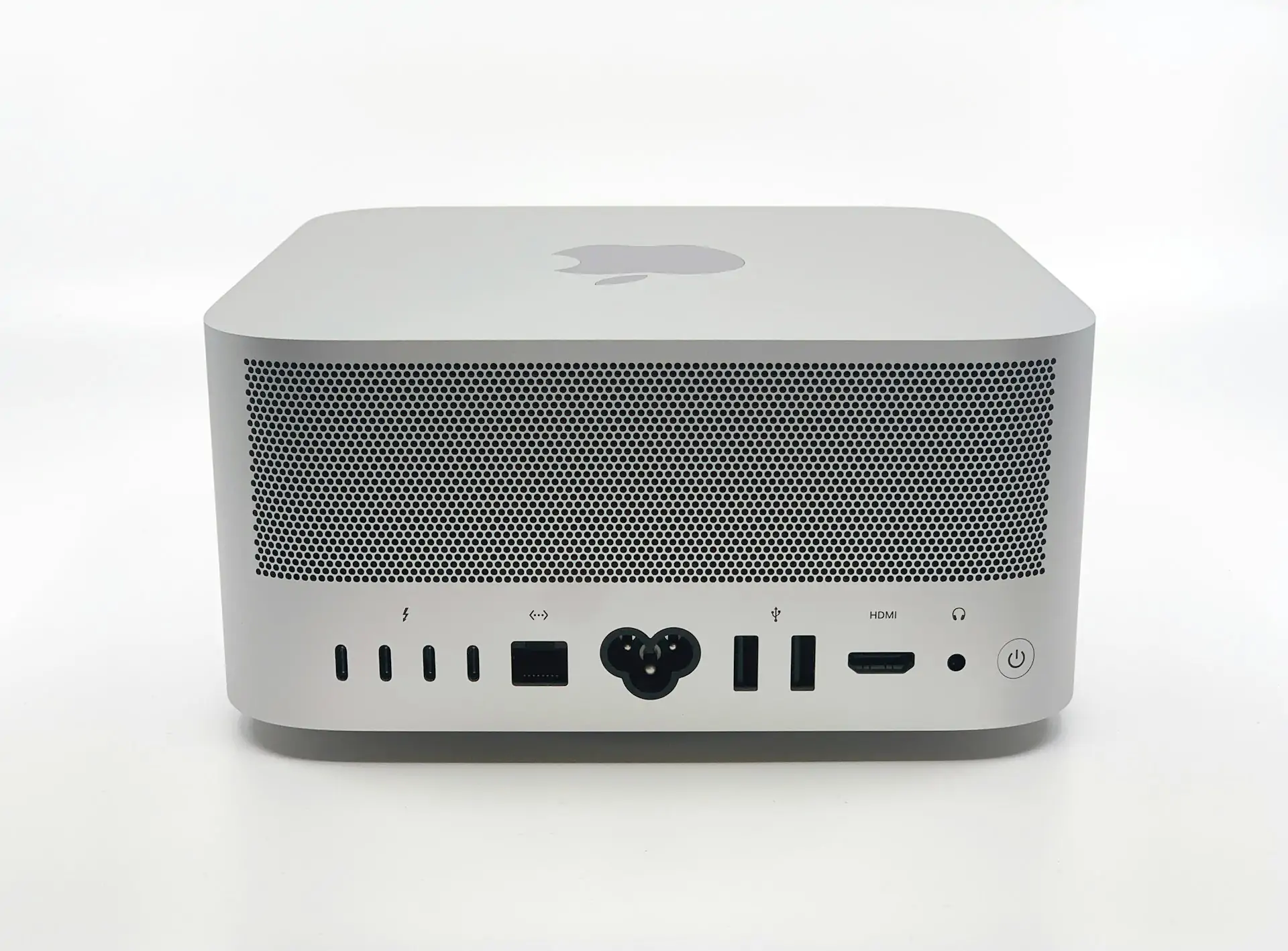
Core Architectural Differences: Understanding the Studio M4 Max vs M3 Ultra
The key to this Mac Studio matchup is not just about performance numbers. It is, in fact, about the deep architectural differences between the two chips. The M4 Max represents Apple’s latest thinking on chip design. It focuses on the power and efficiency of a single, highly advanced die. This approach, for instance, prioritizes features like a faster Neural Engine and superior single-core speed.
The M3 Ultra, on the other hand, achieves its power through a different method entirely. It uses Apple’s innovative UltraFusion technology. This tech essentially stitches two M3 Max chips together so they work as one. As a result, it creates a massive processor with an emphasis on parallel-processing muscle. These contrasting designs are therefore the reason for their very different strengths in pro workflows.
The Next-Gen Efficiency of the M4 Max
The M4 Max chip gets its “next-gen” label from several key advances. Its design is built on a more modern manufacturing process, for instance. This allows for greater power efficiency, meaning it can deliver high performance without using as much energy. As a result, the chip can run cooler and quieter under load.
A major benefit is its superior single-core performance. The cores in the M4 Max can reach higher clock speeds than those in the M3 family. This speed boost is noticeable in many common tasks. Applications feel more responsive, for example, when launching or interacting with the user interface.
The M4 Max also includes a significantly faster Neural Engine. This part of the chip is dedicated to accelerating AI and machine learning tasks. Furthermore, its advanced media engine adds support for AV1 decode, a feature the M3 Ultra lacks. This makes it more efficient for streaming modern video formats.
The Brute-Force Power of the M3 Ultra’s Design
The M3 Ultra’s power comes from a design philosophy of pure force. Its strength is not in new architecture, but in its scale. This scale is achieved through Apple’s UltraFusion interconnect technology. UltraFusion is a major feature that links two M3 Max chips together. The two chips then act as a single, massive processor without a performance bottleneck.
This dual-die approach results in a simple doubling of resources. The M3 Ultra has, as a result, twice the number of CPU and GPU cores compared to a single Max chip. It also offers double the memory bandwidth, reaching up to 800GB/s. Users can configure the M3 Ultra with up to 192GB of unified memory.
This brute-force method is ideal for the most demanding workflows. Brings an increased focus on parallel tasks, such as large-scale 3D rendering and scientific simulations. Also, the presence of two media engines dramatically accelerates high-end video production, especially with ProRes codecs.
Head-to-Head Performance: Mac Studio M4 Max vs M3 Ultra
Chip design theory is a good place to start. Real-world speed, however, is the test that truly matters for pros. The M4 Max and M3 Ultra have their own designs which lead to big changes in day-to-day use. Some jobs, for instance, favor the M4 Max’s fast single-core speed. Other tasks, in contrast, need the M3 Ultra’s huge multi-core power to work well. The next parts of this guide will thus show the results from key tests. These tests use both popular benchmarks and pro apps. This data shows where each chip comes out on top.
CPU Benchmarks that Matter
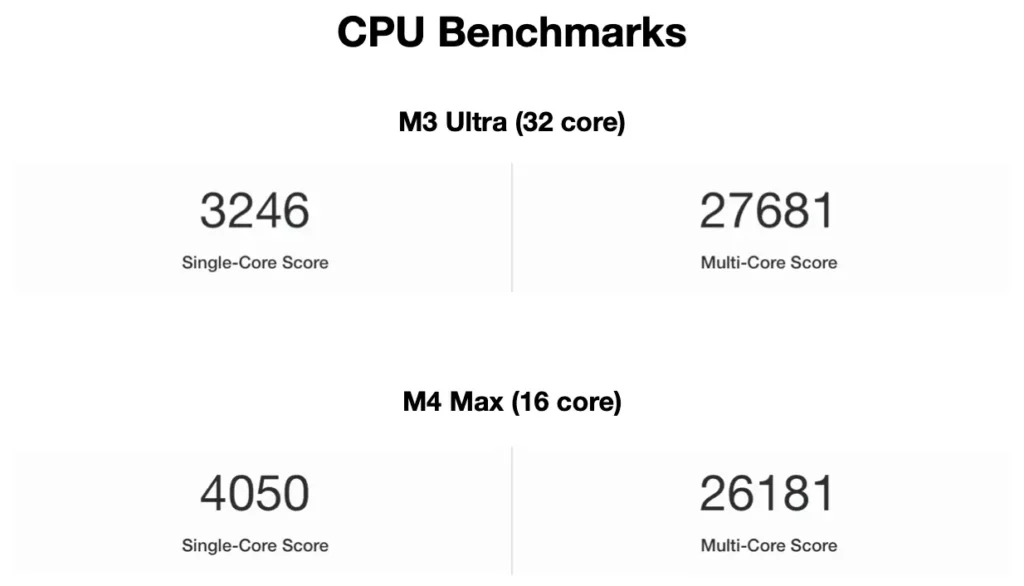
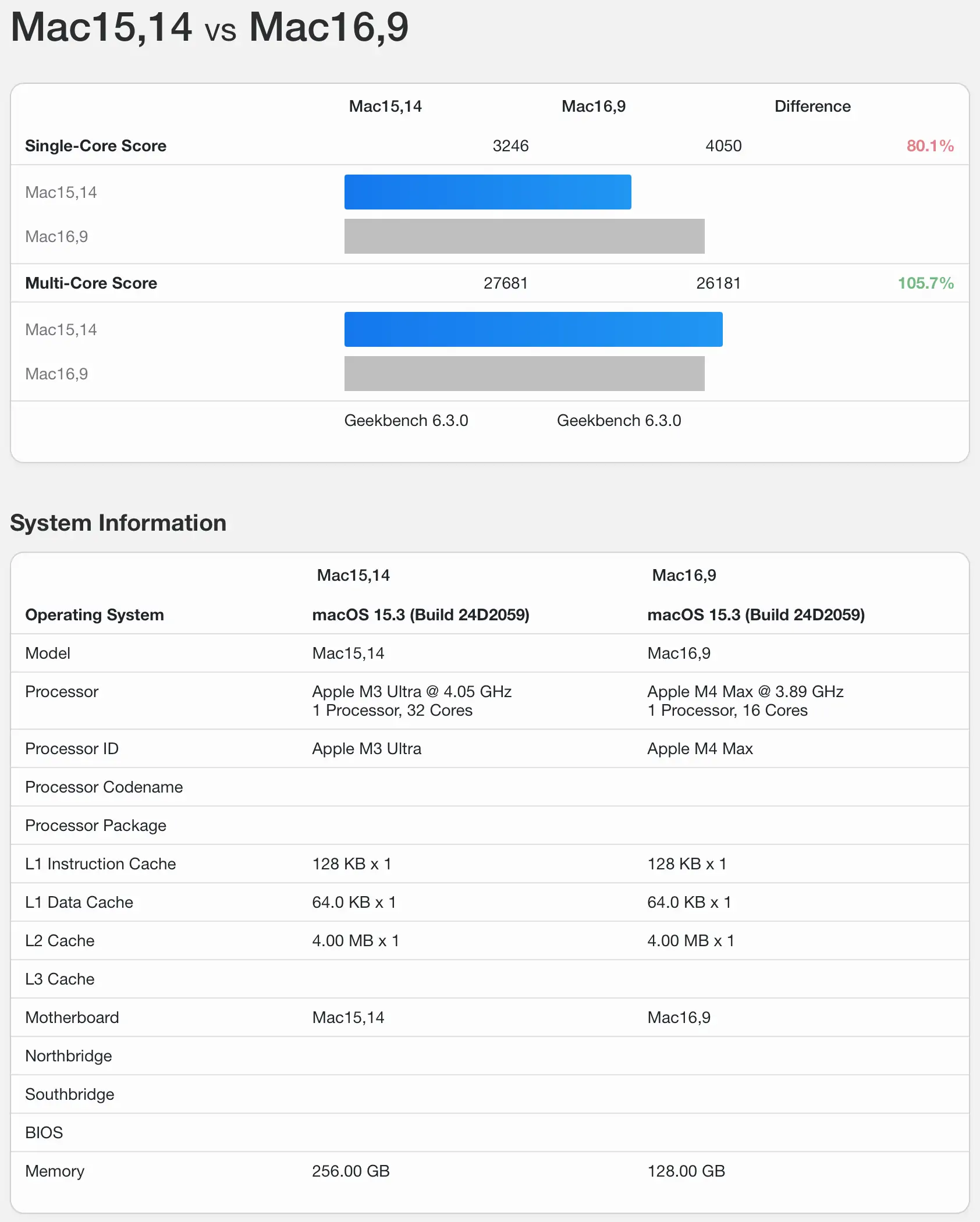
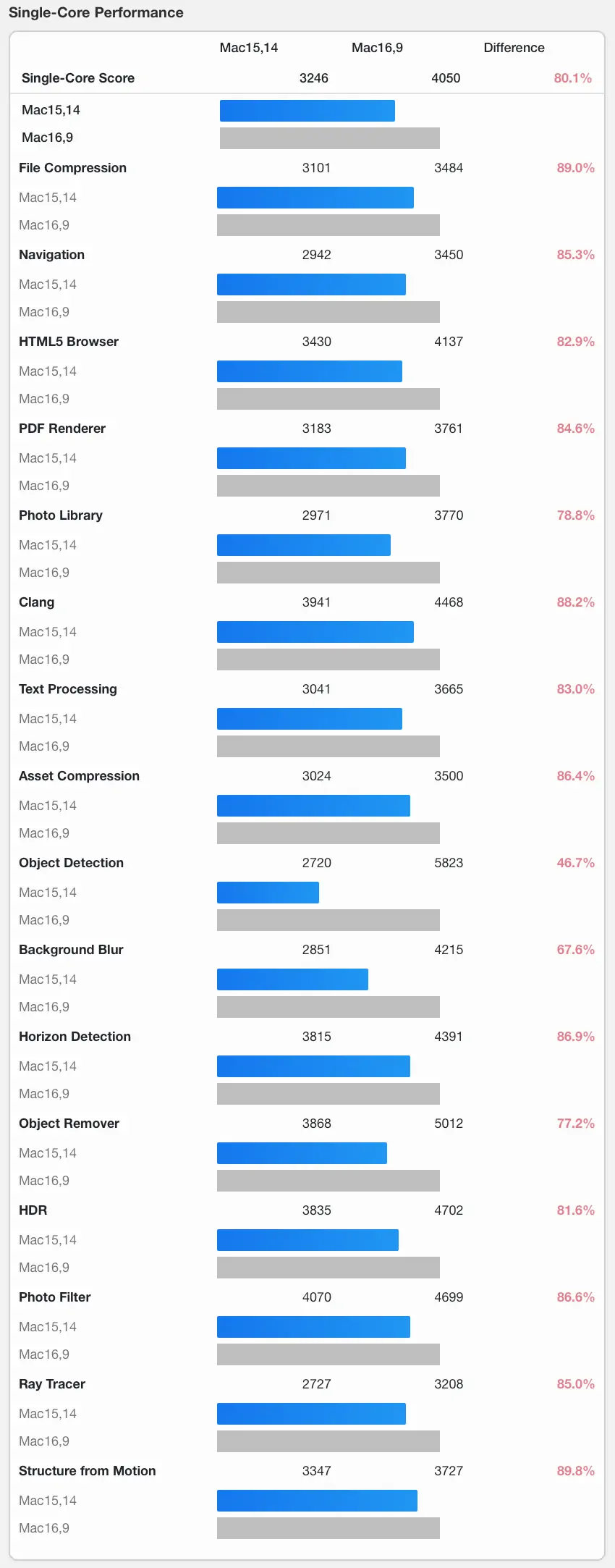
The CPU performance story shows a clear split between the two chips. The M4 Max takes a commanding lead in single-core tasks, for example. In tests like Geekbench 6, it scores around 4,000, easily beating the M3 Ultra’s score of about 3,200 (despite having more single cores). This single-core advantage makes the M4 Max feel faster in everyday use and in apps that rely on a single powerful core.
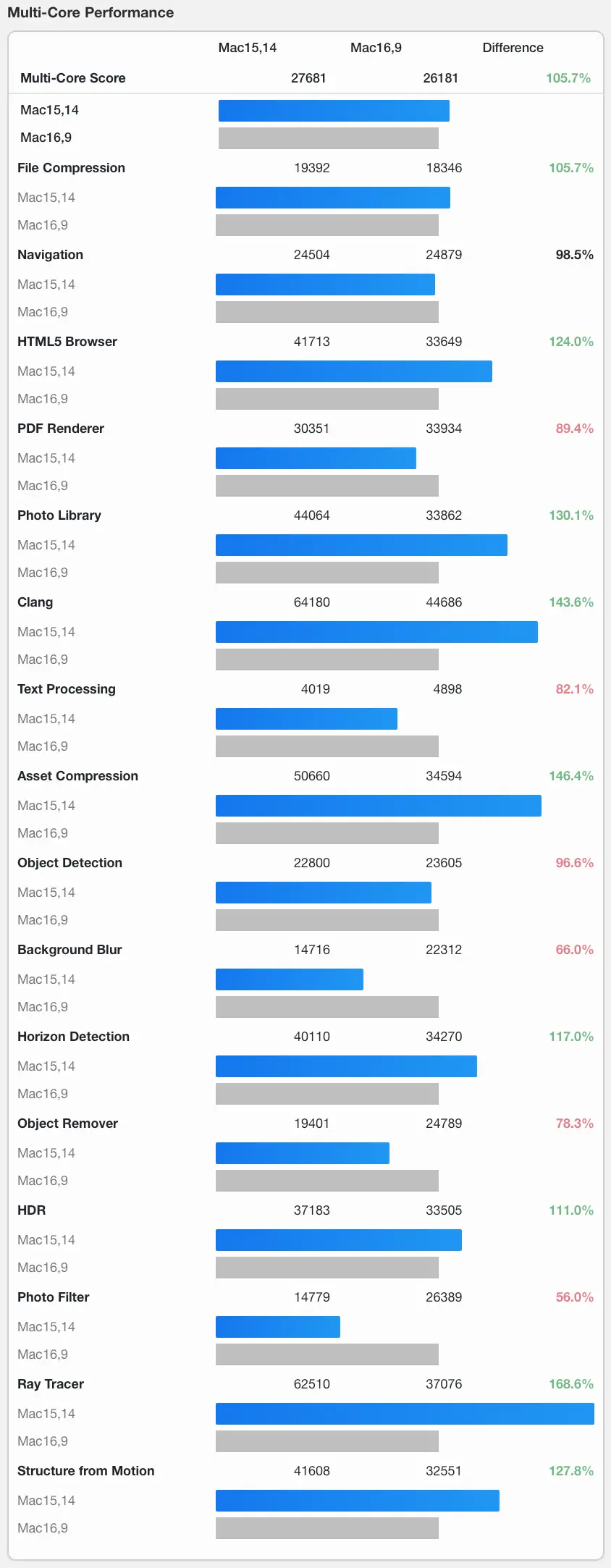
The situation flips, however, when it comes to multi-core tests. The M3 Ultra’s larger number of cores gives it a massive advantage in these tasks. Its Geekbench 6 multi-core score is around 27,500, which beats the M4 Max’s score of roughly 26,181, for similar-ish configuration.
This multi-core dominance also appears in real-world tests. In a Handbrake video encoding test performed by Arstechnica, for instance, the M3 Ultra finishes the job much faster than the M4 Max. Heavy tasks like code compilation or 3D rendering therefore benefit greatly from the M3 Ultra’s brute-force design.
GPU Rendering and Pro App Performance
The M3 Ultra’s graphics superiority is immediately clear in raw benchmarks. Its GPU compute score in tests like GFXBench is nearly double that of the M4 Max, for instance. This is a direct result of it having twice the number of GPU cores. Consequently, this raw power translates to huge gains in GPU-heavy tasks. 3D rendering in applications like Blender, for example, is significantly faster on the M3 Ultra.
Video editing workflows also heavily favor the M3 Ultra. This is largely because its dual-die design includes two media engines instead of one. This feature dramatically accelerates video encoding and decoding. This is especially true when working with multiple streams of high-resolution ProRes video.
The M4 Max, however, does have a key long-term advantage. Its newer GPU architecture includes support for advanced features like hardware-accelerated ray tracing and mesh shading. The M3 Ultra’s GPU, in contrast, lacks these modern features. This could make the M4 Max a better choice for future creative apps that rely on these technologies.
The Verdict for Professionals: Mac Studio M4 Max vs M3 Ultra
The benchmark data paints a very clear picture. There is no single “best” chip in this comparison. Instead, the Mac Studio lineup now offers two distinct paths to power. Each path is tailored for different kinds of professional work. The M4 Max is not simply a lesser version of the Ultra; it is, in fact, a champion for a specific type of user.
Choosing the right machine therefore requires a careful look at your own daily tasks. A workflow that relies on the fastest possible response from a single core will have a very different need. This contrasts with a workflow that can use dozens of cores at once. The sections below offer a clear verdict for each of these user types.
Who Should Upgrade to the M4 Max Studio?
The Mac Studio with an M4 Max chip is the ideal choice for a specific group of power users. These are professionals whose workflows are more sensitive to single-core speed and system responsiveness than to raw multi-core throughput. The M4 Max delivers a snappier, faster experience in a wide range of common pro applications.
Photographers, for instance, will find the M4 Max to be a powerful ally. Tasks in apps like Adobe Photoshop and Lightroom, such as applying complex filters, rely heavily on fast single-core performance. Similarly, many developers will prefer the M4 Max. While compiling code can use many cores, the day-to-day work in an IDE benefits greatly from the chip’s immediate responsiveness.
Audio producers also fall into this category. Many audio plugins and real-time effects are still bound by single-core speed, making the M4 Max a better choice for avoiding latency. Finally, anyone wanting the most future-proof GPU for next-gen 3D apps should consider the M4 Max for its support of hardware-accelerated ray tracing.
Who Still Needs the M3 Ultra Studio?
The M3 Ultra, in contrast, remains the clear king for professionals with heavy parallel workloads. If your work can use all cores for long periods, the M3 Ultra is the only smart choice. Its power is not about quickness, but about constant, heavy work.
High-end video editors, for example, fall squarely into this camp. Workflows involving multiple 8K ProRes streams or complex visual effects need the M3 Ultra’s dual media engines and vast memory bandwidth to avoid dropped frames. In addition, 3D artists and animators who rely on GPU rendering will see their render times cut dramatically by the M3 Ultra’s huge number of GPU cores.
Finally, AI researchers and scientists need the M3 Ultra’s ability to be configured with up to 192GB of unified memory. Training large machine learning models or running complex simulations requires this enormous memory capacity. The M4 Max’s lower memory limit makes it a poor choice for these specialised, data-heavy fields.
Final Recommendations and Future Outlook
The choice between the M4 Max and M3 Ultra Mac Studio is truly a unique one. It shows, for example, that Apple’s chip strategy has matured. The company now offers distinct high-end options for very different professional needs. As a result, there is no longer a single “best” Mac Studio for everyone. This is ultimately a good thing for pro users. They can now pick a machine that truly fits their work.
For a large group of pros, the M4 Max is in fact the smarter choice. Its fast single-core speed and modern features make it a powerful tool for many tasks. However, for those at the top end of video and 3D work, the M3 Ultra is still in a class of its own. Its massive multi-core power remains the peak of what Apple offers.
Looking ahead, the M4 Max’s new design gives us a glimpse of the future. A future M4 Ultra chip, for instance, would likely combine this new tech with the dual-die approach. Such a chip would create a new performance king. For now, however, the choice between today’s Mac Studio models is a welcome one for the pro community.
